Get Maia a WhatsApp + voice number

Get Maia a WhatsApp + voice number

What you'll learn

Two ways to get Maia a WhatsApp number, when to enable Voice, and what Maia does on each channel.

Series
6.4
Section
Settings
Last Updated
May 25, 2026 12:10 AM
Status
Live
Message Maia like a colleague. She's on the channels you live in.

WhatsApp and Voice put Maia on the channels people actually live in. One number, two channels: she'll handle WhatsApp messages and pick up phone calls as the same Maia, with the same context about your brand and your work.

Before you connect anything, there's one decision to make, and it matters. You can either buy a dedicated number through Protaigé, or bring your own existing WhatsApp number. Only one of those options gives you Voice as well, so it's worth picking deliberately rather than picking on price alone.

Choosing how to get the number

The Maia settings tab showing WhatsApp disconnected and Voice greyed out, with two tabs: Buy a Number and My Number

Head to Settings, open the Maia tab, and scroll to WhatsApp. You'll see two sub-tabs: Buy a Number and My Number. This is the headline choice.

Buy a dedicated number through Protaigé is the option that comes with both WhatsApp and Voice. Pick this if you want callers to be able to reach Maia by phone, or if you want a clean work number for Maia rather than mixing her into your personal WhatsApp.

Bring your own existing number lets Maia use the WhatsApp account you already have, verified by OTP. The trade-off is that Voice calls are not available on this option. WhatsApp messaging only.

Both options carry a monthly access fee that scales with your Protaigé plan, and each one comes with a bundle of included messages plus a small per-message charge for anything beyond that. The activation modal shows you the exact pricing for your account before you confirm, so you'll always see what you're committing to.

If you want the full experience, go with a dedicated number. If you're happy with WhatsApp messaging only and you'd prefer a smaller monthly fee, bring your own.

Buying a number through Protaigé

The Buy a Number tab showing a country dropdown and a Search Available Numbers button

On the Buy a Number tab, pick the country you want the number to be based in, then hit Search Available Numbers. Protaigé will show you what's available right now in that country.

A results table of available phone numbers with a Buy button next to each row

Pick a number from the list and hit Buy. The activation modal will show you the exact monthly fee for your plan, the messages included each month, and the overage rate for anything beyond that. Confirm, and the number is yours. WhatsApp is connected automatically, and Voice becomes available to switch on in the section just below.

The activation modal: GET A WHATSAPP NUMBER. Shows the selected phone number, the monthly fee, included messages, overage rate, and Buy Number button.

The activation modal makes the deal explicit before you commit: the monthly fee, the number of messages included, and the per-message rate for anything beyond that. Release the number any time.

Bringing your own number

The My Number tab with a country selector, a phone number field, and a Connect button

On the My Number tab, choose the country and enter the WhatsApp number you already use. Hit Connect. Protaigé will show you the activation pricing for your plan (a smaller monthly fee than the dedicated-number option, with its own included-message allowance and per-message overage), then send a 6-digit OTP to that number via WhatsApp to verify you own it. Punch the code in, and Maia is active on your existing WhatsApp.

Remember, Voice stays greyed out on this route. If you change your mind later and want call handling too, you can release this connection and buy a dedicated number instead.

Turning on Voice

If you bought a dedicated number, scroll to the Voice section and click Turn on voice. Callers can now dial that same number and reach Maia directly.

What Maia does on WhatsApp

Once connected, Maia receives messages from anyone with the number and replies in-thread, the same way she does in Slack DMs. She can also reach out first, sending a message from her own WhatsApp rather than asking you to copy-paste. It's the same Maia with the same toolkit, just on the channel people already use:

💬 Answers about your brand, campaigns, and numbers

🔍 Live research - web search, competitor intel, social listening

🚀 Campaigns - build and orchestrate

✍️ Content - copy, images, video, voiceovers

📣 Social posts - draft and schedule

🧩 Strategy - first cuts and campaign intelligence

Plans and tasks

What happens when someone calls

This is the bit worth understanding properly. When someone dials the number, Maia picks up live. It is not a voicemail box. It is not an IVR menu of options to press. It's a real conversation with the AI account director who already knows your brand, your campaigns, and your work.

She answers, identifies herself, and handles the call the way an account director would: asks what the caller needs, takes the brief, and follows up afterwards. She'll find out who she's speaking to and what they're after, then pass it through to the right place in Protaigé.

For most teams this is the moment Maia stops feeling like a tool and starts feeling like a colleague who covers the line when you can't.

Turning things off

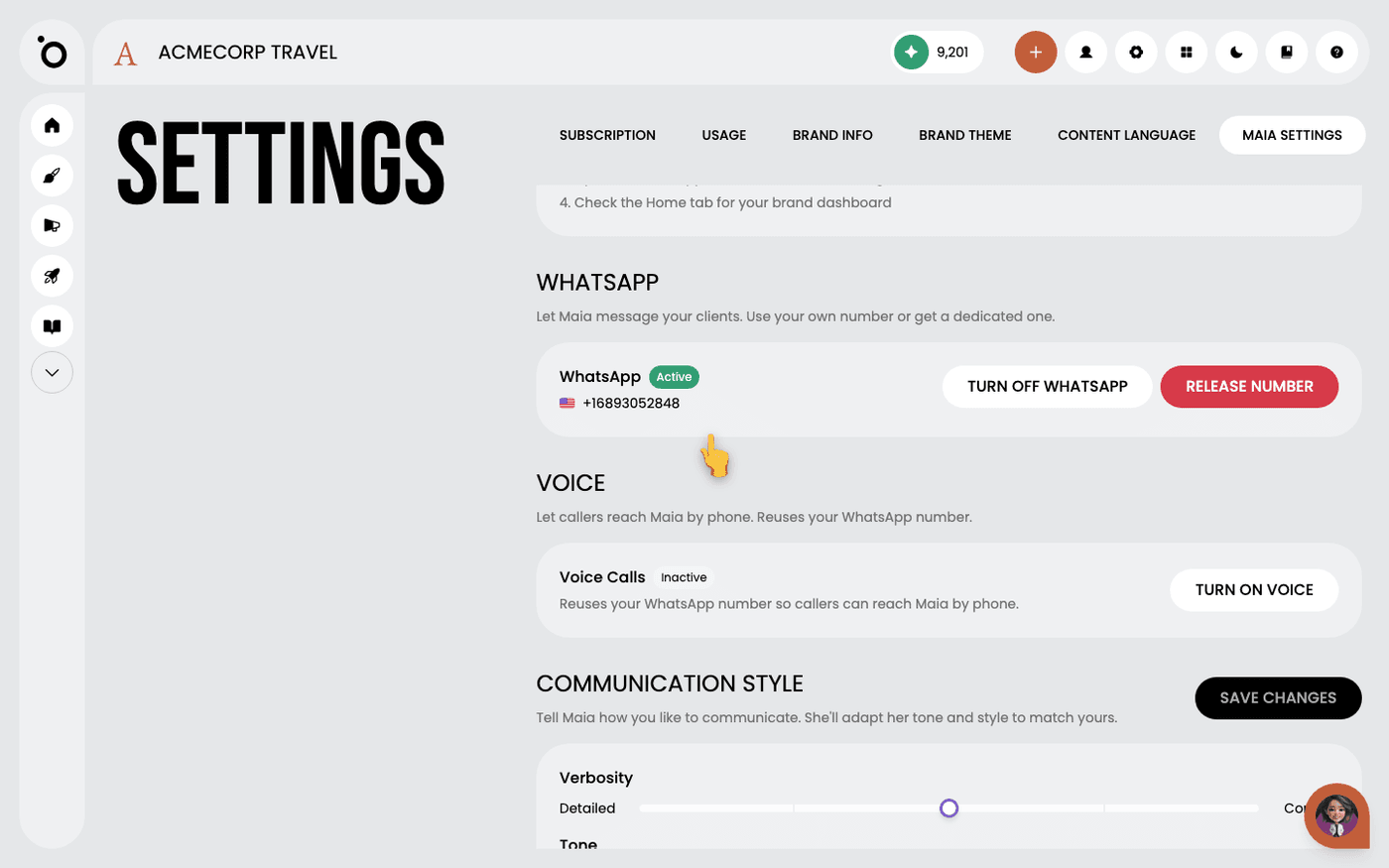
The Voice section in an inactive state, sitting below a connected WhatsApp number

There are two layers to switching things off, and they're independent.

Turn off WhatsApp stops Maia handling messages and calls on this number, but the number stays purchased and you can switch her back on any time.

Release the number gives the number up entirely. Billing stops, but the number is gone and there's no getting it back, so only do this if you're certain.

Voice can be toggled on and off independently of WhatsApp, so if you want her on WhatsApp but not picking up calls, just turn Voice off and leave WhatsApp connected.